Baby Monitor Camera - NannyCam
- 4.2
- Rating
- 10.00K
- Installs
- Free
- Price

 Analysis by App-foxy
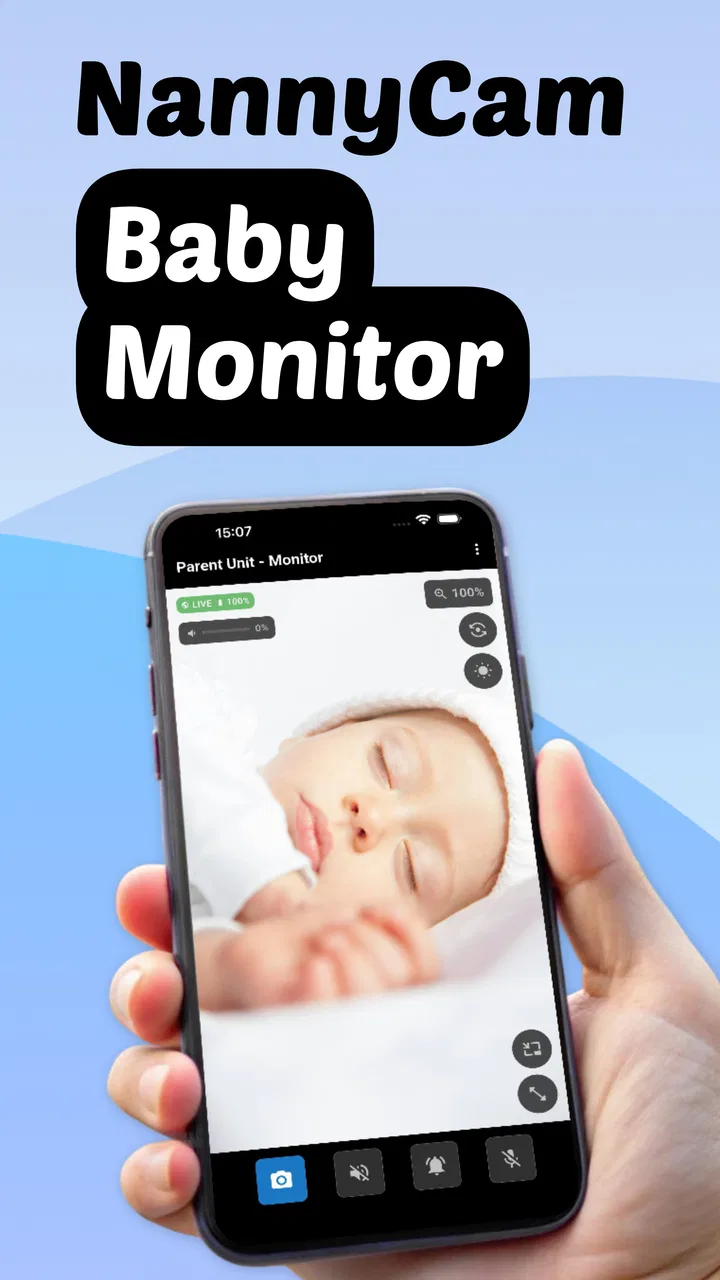
Baby Monitor Camera - NannyCam is the kind of parenting app that sounds most useful at the exact moment a household needs one more pair of eyes. I tested it as a phone-based baby monitor rather than treating it like a simple camera viewer, and my first impression was practical: it turns spare Android or iOS devices into a way to check on a sleeping child, listen for crying, and keep a little distance without feeling completely disconnected.
That convenience is also the central question. A monitor app can feel brilliant during the first few nights, but the real test is whether it remains easy enough to use after the novelty disappears. In my experience, NannyCam has a convincing first-week appeal because it combines video, sound, WiFi and mobile-network use in one setup. Its longer-term value depends much more on your household routine, spare devices, connection quality and willingness to perform a few checks before relying on it.
What the first week feels like
The app comes from Cubetix Ltd. and sits in the parenting category, with a free entry point and optional in-app purchases ranging from $2.99 to $29.99 per item. That makes the initial experiment fairly approachable: you can see whether the basic idea fits your home before deciding whether extra paid functions are worth considering. The age rating is Everyone, which matches the straightforward family use case.
You May Also Like

 Blood Strike: 2.5 Anniversary
Blood Strike’s Loadouts Turn Every Drop Into a Tactical Gamble
A close look at Blood Strike’s custom loadouts: how fast access to signature weapons reshapes its battle royale rhythm, rewards preparation, and narrows the gap between fights.

 Pandora - Music & Podcasts
Pandora’s Music Is Easy to Start, but Harder to Recover
Pandora’s strength is its low-effort path from a seed to a station. Its weak spot is how much confidence it asks you to place in connection, setup, and quiet recovery.

 8 Ball Pool
 Is Built on Rivalries, Rematches, and Routine
A close look at the rivalries, rematches, shared routines, and unanswered safety questions that turn a quick pool match into a persistent mobile community.

 Samsung Music
’s Quiet Strength Is Playing What You Already Own
Its reach comes less from spectacle than from dependable access to a personal library. That simplicity is both the app’s strongest retention engine and its ceiling.

 AccuWeather: Weather Radar
AccuWeather Review: A Quick, Clear Forecast for Everyday Decisions
For everyday plans, the best forecast is the one you can understand quickly. AccuWeather makes rain timing, radar, and local conditions easy to act on, with a few trade-offs.

 Hill Climb Racing
Why Hill Climb Racing Still Turns Crashes Into One More Run
A tiny car, a bumpy hill and one more upgrade: Hill Climb Racing keeps resurfacing because its simple chaos makes every near-miss feel personal.
More From Our News Desk



The basic arrangement is familiar. One device stays near the baby and acts as the camera, while another device is used by the parent for monitoring. This is more flexible than buying a dedicated unit if you already have an unused phone or tablet. It can also be useful for grandparents or a second caregiver who wants to check in from another room, provided the devices and connection are arranged properly.
During the first setup, I would treat the phone placement as seriously as the app itself. A camera pointed at the cot from too low an angle may show very little once a blanket or rail blocks the view. A device placed too close can also create a poor perspective and may be within reach as the child grows. The most useful position is usually stable, out of reach, and wide enough to show the sleeping area without requiring constant adjustment.
The HD video is a welcome part of the experience because a monitor is not only about hearing a sound. Being able to look at the image helps me decide whether a noise is worth responding to, whether the baby has turned over, or whether a brief movement was harmless. Still, I would not confuse an HD feed with a guarantee of perfect visibility. Darkness, glare, distance and the phone’s own camera quality all affect what appears on screen.
The cry-alert function is potentially more valuable than simply leaving a live feed open. A parent who is washing dishes, folding clothes or trying to rest does not necessarily want to stare at a screen continuously. An alert can make the app fit into a normal evening instead of turning monitoring into another full-time task. I found the right mindset is to use alerts as a prompt to check, not as an automatic decision-maker.
That distinction matters because a baby may make a sound without needing immediate attention, while a quiet change in position may still deserve a visual check. I would spend the first few days learning how the alert behaves in my own room, with the usual background noises and sleeping patterns. If it reacts too often, the convenience fades quickly. If it misses sounds that matter to you, confidence drops even faster.
The support for WiFi, 3G and offline use gives NannyCam a broader role than a monitor that only works inside one home network. WiFi is the natural choice for everyday indoor monitoring, but mobile connectivity can matter when a caregiver is away from the house or when the usual network is unavailable. Offline operation is especially relevant for a simple nearby setup, where you want devices to communicate without depending on an internet connection.
I would not assume that every connection mode feels identical. A local offline arrangement can be reassuring for privacy and may reduce dependence on outside service, while a mobile connection introduces the practical question of data use and signal reliability. For a first-week test, I recommend trying the exact situation you expect to use: one evening on home WiFi, one short test away from the room, and one offline check if that is important to your routine.
The app reached version 1.1.0, and that is a useful reminder to keep expectations realistic. A young app can be perfectly usable while still feeling less established than a dedicated monitor brand with years of hardware refinement. I would install it early in the evening rather than five minutes before bedtime, then check video, audio, alerts and reconnection while the household is still awake.
A realistic evening routine
Imagine a parent putting a baby down while another adult prepares dinner. The camera phone remains in the nursery, the monitoring phone sits on the kitchen counter, and the parent keeps the video available while moving around. When a cry alert arrives, the parent looks first instead of rushing in automatically. If the baby settles, the evening continues; if the movement looks different, the parent can respond.
That sounds small, but it is where the app earns its place. The benefit is not merely seeing a child on a screen. It is reducing unnecessary trips while preserving the ability to respond quickly. I also like the possibility of using it during daytime naps, when a parent wants to work in another room but does not want to rely only on hearing through a closed door.
The first week is when NannyCam feels most impressive because every supported mode seems like another solution to a familiar problem. The danger is trying to use all of them at once. A simpler routine is usually better: choose one camera device, one monitoring device, one connection method and one consistent placement. Fewer moving parts make it easier to notice when something has changed.
What remains useful after the novelty fades
The long-term value of a baby monitor app is less about exciting features and more about whether it becomes a quiet part of the household. NannyCam has a reasonable chance of doing that for families who already have spare phones and do not want to purchase dedicated hardware immediately. The free price makes it easy to keep available as a backup even if it is not used every night.
Its usefulness can also change as the child grows. At the beginning, the main value may be hearing crying and checking sleep. Later, the camera can help a parent see whether a child is standing, awake, or trying to leave the sleeping area. That does not turn the app into a safety device, but it can make ordinary supervision less disruptive.
I see a particularly good fit for households that move between rooms or travel between familiar places. A dedicated monitor is convenient once installed, but it is tied to its hardware. A phone-based system can be easier to adapt when the sleeping arrangement changes. The trade-off is that the family must supply suitable devices and remember to prepare them each time.
For shared care, the app can support a handoff between adults more naturally than a single screen mounted in one room. One person can monitor while another rests, cooks or handles bedtime. The important habit is to say clearly who is watching. Technology can show the same feed to more than one person, but it cannot prevent both adults from assuming the other one is paying attention.
The app’s average rating is 4.6 from around 52 ratings, with over 10K installs. Those figures suggest that it has attracted a modest but positive early audience, rather than having the long public track record of a mainstream household platform. I would read that as encouragement to try it, not as a substitute for testing it in the room where you actually need it.
Month to month, the strongest advantage is flexibility. You can keep the arrangement simple for ordinary nights, switch to mobile connectivity when circumstances require it, or use offline monitoring when the devices are close together. That range gives the app more staying power than a basic one-mode viewer. At the same time, flexibility only helps if the controls remain understandable and the family remembers which mode is active.
There is also a useful cost trade-off. The free starting point is attractive compared with buying a new camera, but a spare phone is not truly free if its battery is weak, its camera is poor, or it cannot remain safely positioned for several hours. Optional purchases may add value for some families, yet I would judge them against the total cost of maintaining the device setup rather than comparing only the displayed item price.
The habits that make it dependable
My most important tip is to create a short pre-use check and repeat it until it becomes automatic. Confirm that the camera device is charging, the lens is clear, the monitoring device can hear sound, and the chosen connection is active. Then make a brief test sound before leaving the room. This takes little time and prevents the most frustrating failure: assuming the monitor is working because the app is open.
A second useful habit is to keep the camera phone’s role consistent. Avoid using it for calls, games or other tasks while it is serving as the nursery device. Even without discussing technical background, the practical reason is obvious: every extra task creates another chance for the camera view to stop being available when you expect it.
I would also label the devices mentally or physically as “camera” and “parent.” In a busy home, several phones may be nearby, and choosing the wrong one can waste time at bedtime. This is a small workflow improvement, but it is exactly the sort of detail that decides whether an app survives beyond its first enthusiastic week.
For mobile use, I would test the connection before depending on it during an important nap. A strong signal in one room does not guarantee the same experience elsewhere, and a live video stream is more demanding than a quick message. If the picture becomes unreliable, audio and alerts may still be useful, but I would not treat a partial connection as equivalent to a complete monitor.
Privacy is another reason to think about the chosen mode. A local offline setup may feel more comfortable for parents who want the devices communicating nearby without extending the arrangement beyond the home. A remote mobile setup is more convenient in some situations, but I would use it deliberately, keep the devices under my control, and avoid treating a monitor feed as something to share casually.
Where maintenance starts to wear you down
The main maintenance burden is not likely to be opening the app; it is keeping the whole two-device system ready. Phones need charging, stable placement and enough physical space to remain undisturbed. If the camera device is borrowed during the day, the monitor can disappear precisely when you need it at night. Dedicated hardware has an advantage here because it is already assigned to the job.
Battery management deserves special attention. A phone that looks full at bedtime may have been used heavily earlier, and video monitoring can make a low battery more noticeable. I would keep the camera device connected to power only with a safe arrangement that leaves cables out of reach and does not create a trip hazard. A convenient app cannot make an unsafe cable placement acceptable.
Cleaning the lens is another overlooked task. A small fingerprint or smear can make an otherwise good camera appear hazy, especially around a night-light or window. I would wipe the lens as part of the bedtime routine and check the view from the parent device rather than assuming the picture is clear because the phone itself looks clean.
Updates can also interrupt a settled routine. Since the app is at version 1.1.0, I would avoid making an update immediately before a night when reliable monitoring matters. Test after updating while the child is awake, and confirm that your preferred connection and alert behavior still work. This is not unique to NannyCam, but phone-based monitoring makes the check more important because the app and the device operating system share responsibility.
There is a mental maintenance cost too. Parents may begin by checking the feed constantly, adjusting the camera angle, testing every alert and switching between connection types. That attention can become tiring. My advice is to decide what information you genuinely need. If a clear view and a useful cry alert are enough, do not turn every quiet moment into another technical inspection.
The sources of fatigue
False alarms are probably the quickest way for any cry-alert system to lose goodwill. A monitor that interrupts every small sound can make a parent more anxious rather than more rested. I would give the app a learning period in your real environment, then decide whether the alerts are helping you respond or simply pulling you away from whatever you are doing.
The opposite problem is equally serious: relying on an alert as though it were a complete safety system. A parent may be in the shower, wearing headphones, or in a noisy room. The app should support supervision, not replace it. I would keep the monitoring device close enough to hear and see, and I would never use the existence of a camera as a reason to ignore ordinary safe-sleep and caregiving practices.
Video can create fatigue when it encourages constant watching. The live image is reassuring at first, but repeatedly checking it may make it harder to relax. I found the better long-term approach is to use the screen when there is a reason to look, while allowing sound and alerts to handle routine awareness. The app works best as a tool that reduces unnecessary checking, not as an invitation to watch continuously.
Connection changes can also be stressful. WiFi may be fine in the nursery but weaker in another part of the home. Mobile access can be useful but may feel less predictable, and offline operation is naturally limited by distance. Because NannyCam offers several ways to connect, it is tempting to assume that one mode will automatically rescue another. In practice, I would choose the simplest reliable option and keep a backup plan that does not depend on the app.
This is where a dedicated monitor may be better. If you want a device that is always in the nursery, has a purpose-built parent unit and requires little daily rearranging, buying dedicated hardware is the calmer choice. NannyCam is more appealing when flexibility, low initial cost and the ability to reuse existing phones matter more than a permanently installed system.
I would also skip it if your household has no suitable spare device, poor connectivity in the monitoring area, or no reliable way to keep the camera phone powered and out of reach. The app cannot solve those physical limitations. It is a strong workaround for a phone-equipped home, not a universal replacement for a complete nursery setup.
Does it earn a permanent place?
After the first-week excitement, I think Baby Monitor Camera - NannyCam can earn lasting space for the right family because its value comes from repeated ordinary use. It can cover a nap, a cooking session, a bedtime handoff or a temporary sleeping arrangement without demanding dedicated hardware from the start. The combination of video, sound, cry alerts and several connection approaches gives it more practical range than a bare camera feed.
Its lasting appeal depends on discipline. The parent who checks power, placement, audio, connection and alerts will get a more dependable experience than someone who installs it once and assumes it will always be ready. That may sound like extra work, but it is the honest trade-off for using general-purpose phones instead of a purpose-built monitor.
I like the app most as a flexible everyday helper and a useful backup. It is especially sensible for parents who already have an older phone, need monitoring in more than one room, or want to test the idea before spending more on equipment. The free starting point lowers the risk, while the optional purchases leave room for families who decide the additional functions justify the cost.
I am less enthusiastic about using it as the only layer of supervision in a demanding setup. If a child’s room is far from the parent, the network is inconsistent, or missed alerts would create serious concern, a dedicated monitor with a stable, purpose-built arrangement may be the better investment. NannyCam should make supervision easier, not encourage false confidence.
Overall, I would recommend trying it with a controlled routine rather than judging it after a rushed installation. Set it up during the day, test every connection you expect to use, observe the alert behavior in your own home and decide whether the maintenance feels manageable. If the checks become second nature, the app has real month-to-month value. If charging, repositioning and troubleshooting already feel like too much, that is a clear sign to choose a simpler dedicated alternative.
For a free parenting app developed by Cubetix Ltd., NannyCam makes a thoughtful case for turning existing devices into a practical baby monitor. It is not magic, and its usefulness is tied to the quality of the phones and the habits around them. But when those pieces fit, I can see it remaining on a family’s devices long after the initial curiosity fades—quietly useful, inexpensive to try, and flexible enough to adapt as daily life changes.
FAQs for Baby Monitor Camera - NannyCam
01How secure is the Baby Monitor Camera - NannyCam app?
The Baby Monitor Camera - NannyCam app prioritizes user security by implementing end-to-end encryption to protect video and audio streams. Additionally, it requires a secure login and offers options for password protection. It’s crucial to ensure that both your mobile and monitoring devices are updated to the latest software to bolster security measures.
02Does the app support multiple camera connections?
Yes, the Baby Monitor Camera - NannyCam app supports multiple camera connections, allowing users to monitor different rooms simultaneously. This feature is particularly useful for parents with more than one child or those who want to keep an eye on different areas of the house. Ensure your network can support multiple streams for optimal performance.
03What are the audio and video quality like in the app?
The Baby Monitor Camera - NannyCam app offers high-definition video quality and clear audio transmission. Video streaming quality may vary depending on your internet connection, but the app is designed to adapt to varying bandwidths to provide a seamless experience. For the best results, ensure your Wi-Fi connection is stable and robust.
04Can I use the app when I’m away from home?
Yes, the Baby Monitor Camera - NannyCam app allows remote access, enabling you to check on your baby from anywhere with an internet connection. This feature is perfect for parents who need to step out but want to maintain peace of mind by monitoring their child's activities remotely via a smartphone or tablet.
05Is it possible to receive alerts or notifications through the app?
The app offers customizable alerts and notifications to keep you informed about any activity detected by the camera. You can set it up to send notifications for sound or motion detection, ensuring you are alerted promptly to any unusual occurrences. This feature helps you stay aware even when the app is running in the background.
Pros
- Easy setup with intuitive interface.
- High-quality video streaming.
- Two-way audio communication.
- Real-time alerts for movements.
- Secure connection with encryption.
Cons
- Requires stable internet connection.
- Limited free features available.
- Battery drain on long usage.
- Occasional connectivity issues.
- Subscription needed for full access.

Baby Monitor Camera - NannyCam
Gallery